
![[Page Banner Image]](images/hprods.gif)
RCS-7 NT is Auspex's Windows NT based SCADA system. Windows NT is at the beginning of its product life cycle and is on the leading edge of networking and server technology. It is rapidly becoming the operating system of choice for the next decade and beyond. With a Windows NT operating system, the SCADA system is inherently open which allows the customer to use either Workstations, PCs or both.
RCS-7 NT is modular in design and takes advantage of the Windows NT multi-threaded environment. A common state-of-the-art relational database product is used for the SCADA system and a uniform interface is supplied to this database for maintenance, display and updating in a distributed environment. A procedure for the relational database interacts with the data acquisition scanners, updates the data, generates change events and guarantees data integrity.
Standard Features
RCS-7 NT standard features include: real-time calculations, data trending, on-line database generation, off-line database generation, report generation, alarm processing, scan definition and generation and restart, telemetry data processing, composite points, event logging, redundant loggers with automatic device failover, remote or dial-in operator stations and networked operator stations.
Database
RCS-7 NT real-time database is table driven and can be modified to include new data and data attributes without software changes. The database is accessible by application programs. The database tools on-line and off-line maintenance functions allow the user to build, modify, or delete entries and effectively manage data.
Point definitions can be entered on-line through an operator terminal. Off-line points are entered using an ASCII source file. An ASCII file containing existing database information can be edited for use by the off-line database generation subsystem.
The database includes attributes on each datum such as: last changed time stamp, last changed by, minimum, maximum, average, integrated, engineering units, scale and bias factors, alarm limits, tagged by (control inhibited), alarm processing, group and composite points.
Telemetry
RCS-7 NT supports most protocols that are byte oriented, asynchronous operation, without I/O custom drivers. RCS-7 NT has a multi-protocol handler which enables communication with different protocol devices concurrently. The computers communicate with the field devices using dial-up telephone, leased line, microwave, radio or satellite interfaces. Additional wide area or local area network interfaces can be used.
Telemetry data processing supports: status, analogs, accumulators, rate-of-change processing, data smoothing, demand scan, data time tagging, change of state (COS) and sequence of events (SOE).
Telemetry can be configured to scan data continuously, periodically, specific times, on an event, or on demand.
An optional S-FEP is available for special protocol and hardware requirements. The S-FEP converts older, non-byte protocols such as CONETEL 20-20 or QUICS-II to a byte protocol for processing.
Supervisory Control
RCS-7 NT supports momentary controls (status), set point controls, raise/lower controls, and parameter downloads. The momentary controls include 4 state processing open/travel/close for devices such as valves, gates, or other 4 state devices.
Graphic Trending
RCS-7 NT graphic trending allows real-time or historical trend data to be graphically displayed as a multi-channel strip chart recorder. One to four "pens" can be defined per trend. The trend resolution can be pre-defined at definition time to compare data of different scales on one trend.
Alarming
RCS-7 NT processes alarming as data is collected or calculated. Alarm processing includes: display, event logging, historical recording, delayed alarming, audible alarm and multi-point alarms. Alarming supports 2 and 4 state status, 2 state status with memory, analog limits and accumulator rate of change limits.
Alarm Display
RCS-7 NT allows the user to determine how alarm information is displayed and acknowledged. The alarms can be displayed as first-in-first-out (FIFO) lists in or last-in-first-out (LIFO) lists. The display can show only acknowledged alarms, unacknowledged alarms or both. Alarms can be acknowledged individually, per page or by color. Alarms can be defined to be deleted upon acknowledge, deleted upon return to normal or deleted automatically.
Alarms can be acknowledged either through push buttons or via select sequences. The operator can select and acknowledge individual or multiple alarms. Acknowledge alarms of the same color or acknowledge all alarms. The operator can also acknowledge alarms via dedicated push-buttons. Alarms can be deleted by the operator in a similar manner.
The following is a simple example of an alarm display. Depending on the type of application, additional fields may be required and different function keys used.
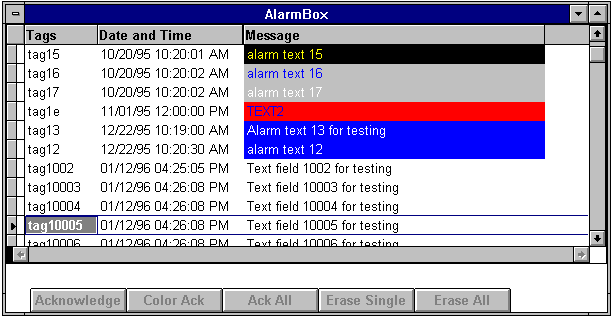
The alarms fields can be moved around, expanded or reduced to meet individual project requirements. Selected fields also toggle between different functions. For instance, the Date and Time stamp column and be changed to time only by clicking on the header with the right mouse button. Clicking on the column header Tags or Date and Time with the left mouse button changes the alarm display order. The alarm box display is OLE compliant so it can be included in any OLE aware application.
Reports
RCS-7 NT report generation is supported by most database systems such as Access, Excel, FoxPro and Crystal Reports. When a report is created, the operator has the option to send the report to a hard copy device and/or save it to a file to be printed at a later time.
Networking
RCS-7 NT operates over most networks. The following are example networks:
Support for WAN & LAN is provided.
Through optional hardware and/or software, the RCS-7 NT SCADA system can connect and communicate with an SNA network.
Security
RCS-7 NT supports operator log-in and multiple levels of security access.
Optional Software
Optional features include: load management, RTU emulation, historical data collection, capacitor switching, automated or on-demand control sequencing, breaker statistics, remote logging, automatic system fault detection, CPU failover, map-board interface, and source code. Also offered is Auspex's SCADA Front End Processor (S-FEP) for improved telemetry processing with most field devices and protocols.
System Software
The following packages are off-the-shelf, proven products utilized by the Auspex SCADA system:
Windows NT Server - Windows NT Server is the foundation that allows organizations to build strong client-server technology. It combines the file and print capabilities with the application services of UNIX in one multipurpose network operating system. As an extremely fast file and print server, Windows NT Server allows you to share information and access printers and other devices across the network. It provides the application infrastructure that lets you buy or build solutions for your business. Windows NT Server supports numerous turn-key business solutions - from general accounting to inventory control systems. With Windows NT Server, leading applications from Oracle, Sybase, Btrieve, SAP, and others also provide the building blocks to develop solutions tailored to your organization.
Whether building new solutions or adding to an existing network, Windows NT Server helps ensure that the system is reliable, secure, easy to use, and scaleable to accommodate growth in your organization.
The Server supports thousands of client-server applications and runs on a wide range of scaleable hardware such as Pentiums and Alpha AXPs. Windows NT Server includes a directory service that aids in the management and control of network resources. System administrators benefit from automatic account replication and centralized management features. For example, in one operation, administrators can add new users to a group and instantly give them secure access to all of the resources to do their job.
Interoperability is not a problem with Windows NT Server since it's designed to integrate with all popular client operating systems such as MS-DOS, Windows 3.x, Windows 95 and Windows NT Workstation.
SQL Server - Microsoft SQL Server is specifically designed for distributed client-server computing. It provides in one box, a complete and integrated system of scaleable high-performance database management software.
Powerful data replication provides a reliable way to disseminate accurate information and improve its availability throughout the user's enterprise. A comprehensive distributed management framework lets you centrally manage all the database servers in your organization. With advanced Windows-based management tools and server-based job scheduling you have visual control over multiple servers and can automate remote operations for "lights out" command of your distributed environment.
Through integration with key desktop technologies, SQL Server provides end users with unparalleled data access. And its open architecture - based on industry standards - ensures interoperability with the broadest range of applications, development tools, host gateways, and networks. Many of the performance and reliability gains are achieved through close integration with the Microsoft Windows NT Server platform. Taking full advantage of the native Windows NT threading and scheduling services simplifies the SQL Server architecture, which further improves performance and scalability. Because user tasks are isolated from one another, reliability also increases. And preemptive task scheduling balances the work-load automatically across CPUs, providing smoother operations at a lower cost.
SQL Client - Used when applicable on each PC operator station in conjunction with SQL Server.
Visual Basic - Since its inception, Visual Basic has set new levels of productivity and ease-of-use for developers. It introduces to the user a visual way to create a user interface by assembling pre-built components by supplying a flexible programming language , a syntax-checking editor, and debugging tools for faster delivery of the applications. Visual Basic supports many popular data formats through a built-in database engine. You may use visual controls for no-code data access - or, in the Professional Edition, use a programmatic layer for complete control over data access.
The user can build their own applications from reusable components in Microsoft Excel and Word, by using OLE Automation, a powerful extension of object linking and embedding (OLE). Visual Basic is a flexible development system with a powerful language, complete debugging tools, and a wealth of third-party add-on products, making it easy to create a range of custom solutions such as: client-server applications, work group software, office productivity utilities, network utilities, executive information systems.
Visual Basic includes the database engine from Microsoft Access (Jet), which provides simultaneous data access with Microsoft Access, Microsoft FoxPro 2.0 or 2.5, dBASE, Paradox 3.0 or 3.5, Oracle, Microsoft SQL Server, and Btrieve - and other formats via the vendor-neutral Open Database Connectivity (ODBC) programming interface.
Windows NT Workstation - Windows NT Workstation protects applications from each other while they share data seamlessly through OLE. It provides preemptive multitasking so that users can simultaneously work with multiple applications with increased responsiveness. And system administrators get total control over line-of-business applications, so that mission-critical data is protected from unauthorized or inadvertent changes.
Windows NT Workstation supports more than 15 networks and protocols - including TCP/IP and Client Services for NetWare - making it easy to cost-effectively integrate with your existing networks. From a single reliable environment, you can write desktop applications that run on both Windows NT Workstation and Windows 95. You can use the same set of visual tools - Visual Basic, Visual C++ development systems, Visual FoxPro database, and SQL Workstation - to create both client and server applications. Windows NT Workstation will not crash during stress testing and debugging.
Visual FoxPro - The powerful relational database management system combines a visual development environment with tools for rapid application development. The user can access remote data sources through built-in ODBC drivers. Build client-server applications that query and update remote data. With OLE support, you can edit "in place", an object brought in from another application. The user can build graphical HELP systems with the HELP compiler. Local Visual FoxPro data can be adapted quickly to run on Microsoft SQL Server back-ends.
MMI Interface - The inherent open nature of the RCS-7 NT system allows for unlimited number of MMI interfaces and in most cases will allow multiple packages concurrently. The MMI packages only need to be able to interface to RCS-7 NT via ODBC (Open Database Connectivity). This flexibility allows the customer to choose an MMI package that is best suited for their needs such as: ArcView, Wonderware, FactoryLink, etc. and allow future upgrades independent of Auspex.
System Support
Basic system support is available as a service contract with Auspex, Incorporated providing unlimited support using our in-house equipment, telephone and/or modems to repair, modify or change an existing computer system. Expanded system support is also available which includes the basic system support plus software updates (source or object depending on customer licenses) for the RCS-7 NT software.
Standard service hours are between 8:00 a.m. and 5:00 p.m. Central Standard Time, Monday through Friday, except on holidays. Emergency service is available 24 hours a day, 7 days a week.
 Open architecture Serviceable by end user Supports legacy field devices along with new technology Scaleable, new workstations can be added as
required Distributed, new servers can be added as
required WAN support for remote operation and support
Open architecture Serviceable by end user Supports legacy field devices along with new technology Scaleable, new workstations can be added as
required Distributed, new servers can be added as
required WAN support for remote operation and supportQuotes available on request.
![[HRule Image]](images/div.gif)
Auspex, Incorporated, 12475 Gulf Freeway, Suite G1, Houston, TX 77034
713-524-3100
Copyright © 1996-2010 Auspex, Incorporated
Last modified: December 28, 2009